When a child attends an online English lesson, an adult the parent may never meet in person enters the family’s home via a screen. That is not a reason to avoid online learning. It is a reason to be deliberate about which platform and which teacher are involved before the first session begins.
Safety and privacy in children’s online lessons cover several distinct areas that parents rarely check in combination: who the teacher is and how the platform verified that, what safeguards govern the live session itself, how the platform stores and uses the child’s personal data, and how parents receive information and can raise concerns. This checklist addresses all four areas in plain language.
It is aimed at parents of children aged 3 to 14. It does not cover group classes with peers the family already knows, or supervised school-based online sessions where institutional safeguarding is already in place.
Why a Structured Safety Check Matters
Most parents spend more time comparing lesson prices than comparing safety policies. The gap is understandable. Safety concerns feel abstract until something goes wrong, and the checklist below looks longer than a price comparison. But the questions here take roughly 20 minutes to answer in full, and the answers reveal a great deal about how seriously a platform takes child protection — before a single lesson begins.
A platform that cannot clearly explain its teacher vetting process, its lesson monitoring policy, or its data retention terms is a platform worth questioning before handing over payment and a child’s contact with an unknown adult.
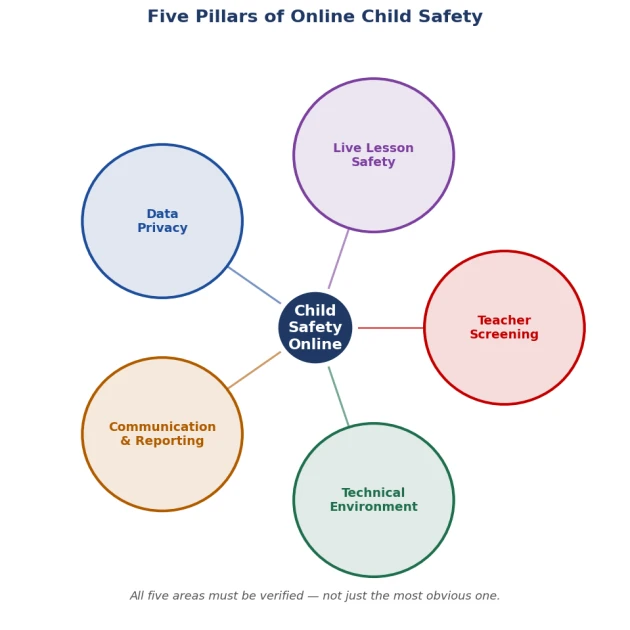
Five pillars of child safety in online English lessons
Section 1: Teacher Screening and Verification
The most direct safety question is who the teacher is. A platform that allows any adult to register as a teacher with minimal verification poses a genuine risk that no curriculum quality can offset.
| Item to Verify | Done? |
| The platform conducts background checks on all teachers before they can teach children | [ ] |
| Teacher identities are verified with government-issued identification | [ ] |
| Teachers hold recognised English teaching qualifications such as TEFL, CELTA, or equivalent | [ ] |
| A clear policy exists describing what disqualifies a candidate from teaching children | [ ] |
| Parents can view teacher profiles including qualifications and verifiable experience before booking | [ ] |
| A process exists for parents to formally report concerns about a specific teacher | [ ] |
Section 2: Live Lesson Safety
What happens during the lesson itself is as consequential as who the teacher is. Platforms vary widely in how much visibility parents have during live sessions and what rules govern teacher behaviour.
| Item to Verify | Done? |
| Parents are permitted to observe lessons at any time without prior notice to the teacher | [ ] |
| Lessons are conducted via video call with both audio and video active throughout | [ ] |
| The platform prohibits private messaging between teachers and students outside the lesson environment | [ ] |
| Lesson recordings are available or can be requested by parents after each session | [ ] |
| Teachers cannot disable the video feed or contact the child through any channel outside the platform | [ ] |
| Explicit rules govern what topics teachers may and may not discuss with children | [ ] |
Section 3: Data Privacy and Account Security
When a child enrols on an online English platform, the platform collects personal data. This typically includes the child’s name, age, photograph, lesson recordings, and progress history. Parents should verify how that data is handled, retained, and protected before it is collected.
| Item to Verify | Done? |
| The platform publishes a clear privacy policy covering how children’s data is collected and used | [ ] |
| Personal data, including recordings and progress reports, is not shared with third-party advertisers | [ ] |
| Lesson recordings, where stored, are accessible only to the family and authorised platform staff | [ ] |
| Parents can request deletion of their child’s data when leaving the platform | [ ] |
| The platform states compliance with applicable data protection regulations | [ ] |
| Parent and child accounts are protected by passwords and, where offered, two-factor authentication | [ ] |
Section 4: Communication and Reporting
A genuinely safe platform makes it easy for parents to stay informed and to escalate concerns quickly. A platform that is difficult to reach, slow to respond, or vague about its safeguarding processes is not meeting a basic standard of care, regardless of how strong its marketing claims are.
| Item to Verify | Done? |
| The platform provides a clearly labelled channel for reporting safety concerns about teachers or lessons | [ ] |
| Post-lesson reports or summaries are provided after each class so parents can review what occurred | [ ] |
| Customer support is reachable within 24 hours for concerns that parents flag as safety-related | [ ] |
| The platform has a named child safeguarding or child protection policy, not only general commercial terms | [ ] |
| Parents are notified of any change in teacher assignment before the affected lesson takes place | [ ] |
| A formal escalation process exists for serious concerns beyond standard customer service channels | [ ] |
Section 5: Technical Environment
The digital environment of the lesson should be as safe as the person delivering it. This includes the software used for the session, the content shown during lessons, and how the platform handles a child’s presence online.
| Item to Verify | Done? |
| The platform uses an encrypted video connection for all lessons | [ ] |
| Lesson materials are age-appropriate and vetted by the platform, not uploaded at a teacher’s discretion | [ ] |
| Children do not need to create accounts on social media or third-party platforms to access lessons | [ ] |
| No advertising is displayed to children within the lesson platform or application | [ ] |
| Screen-sharing by the teacher is limited to lesson materials provided by the platform | [ ] |
| A child-specific account can be set up with access restricted separately from the parent’s account | [ ] |
How 51Talk Approaches Child Safety and Privacy
What 51Talk Is
51Talk is a structured one-on-one English platform for children offering 25-minute lessons with trained teachers and CEFR-aligned materials. Lessons take place via video call using platform-provided content, with post-lesson feedback reports and unit-level progress assessments built into the learning cycle.
Why 51Talk’s Model Is Worth Evaluating on Safety
51Talk’s one-on-one format means lessons do not take place in open group chat rooms with unknown participants. Each session is a direct connection between one trained teacher and one child, using materials controlled by the platform rather than improvised by the teacher. Parents can observe lessons and receive feedback reports after each class. Because the curriculum uses prepared materials, there is a clear record of what was covered in any given session if a parent has a question about it later.
How Parents Should Verify 51Talk’s Current Safety Policies
Before purchasing any package, parents should use the five checklists above as the basis for direct questions to 51Talk’s customer support team. Ask specifically about teacher background check procedures, lesson recording access, data deletion rights, and the safeguarding escalation process. Request written confirmation of the answers. Policies change over time and written confirmation at the point of purchase is more reliable than general platform descriptions.
Frequently Asked Questions
Does 51Talk screen teachers before they can teach children on the platform?
51Talk works with teachers who complete a training and evaluation process before being assigned to students. The specific steps of that vetting process, including background check procedures and qualification requirements, should be confirmed directly with 51Talk’s support team before enrolling. Ask for the current process in writing rather than accepting a verbal or general reassurance.
Can parents observe a child’s online English lesson without the teacher knowing in advance?
Most reputable platforms, including those operating a one-on-one model, allow parents to observe lessons without prior notice. Confirm this explicitly with the platform before enrolment. A platform that requires the teacher’s consent for a parent to observe their own child’s lesson is applying a policy worth understanding before the first session.
Are lesson recordings stored, and who can access them?
Policies vary by platform and region. The questions to ask are: whether sessions are recorded at all, how long recordings are retained, who can access them, whether parents can request copies, and under what circumstances the platform would share recordings with third parties. These are section 3 checklist items that should be answered in writing before purchase.
What should a parent do if a teacher behaves inappropriately during a lesson?
End the session if necessary. Note the exact date, time, and what occurred. Report the incident to the platform immediately and ask for the formal escalation process rather than standard customer service. Keep any screenshots or recordings if they are accessible. Do not wait to see whether the issue recurs in a subsequent lesson. The section 4 checklist above covers the reporting infrastructure that should be in place before this situation arises.
Do children need to share personal information to register on online English platforms?
Most platforms require at minimum a name and age. Some also collect photographs, video, or lesson recordings. The relevant questions are what is collected, whether it is shared with third parties, how long it is retained, and whether it can be deleted on request. These are section 3 items. Review the privacy policy in full before completing registration, not after.
What to Do Next
Print or save the five checklists above before you contact any platform. Work through each section and record the answers. If a platform cannot answer any of the verification questions clearly, or if the answers require follow-up that never arrives, that gap itself is meaningful information. Take a trial lesson to observe the technical environment and teacher behaviour before purchasing a package. Keep your written notes. They are the most valuable reference you have if a question about the platform’s conduct arises later.